Stop losing items in
spreadsheets, emails, and Procore tabs.
Every tag. Every PO. Every submittal. One place. One project.
You've been doing this the hard way.
Perch was built by a working construction PM who got tired of the chase.
Everything you actually track. Nothing you don't.
Built for the day-to-day reality of running a construction project. No PM theater, no consultant features, no certifications required to use it.
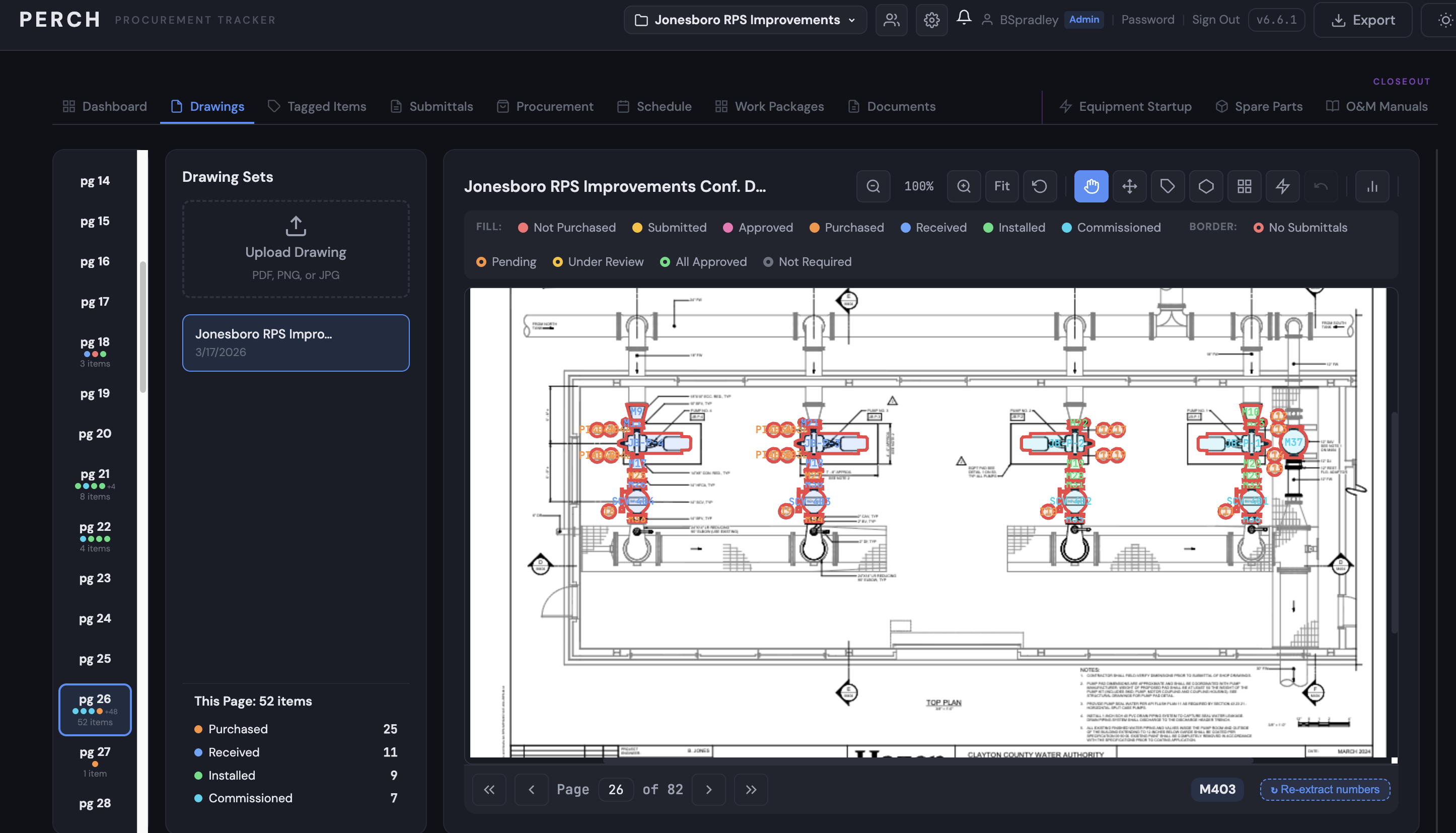
Visual tagging on drawings
Tag every equipment item directly on the PDF. Polygon outlines, magic-select for irregular shapes, multi-page markers. Filter by status with one click.
PO tracking with auto-linking
Log purchase orders once and link them to every tagged item they cover. CSV import, vendor tracking, cost rollups.
AI-powered submittal detection
Upload a spec section and Claude reads it for you — finds shop drawing, product data, sample, and O&M requirements automatically.
Closeout that starts on day one
Equipment startup, spare parts, and O&M manual tracking — all auto-detected from your specs. No more 60-day closeout marathon.
Requisition forms in seconds
Generate requisition spreadsheets that match your company template. Pull from project info and PO data. No more retyping addresses.
Work packages that scope themselves
Pick the drawings, the inventory follows. Pick the equipment, the startup requirements follow. Build a complete work package in two minutes.
Your whole project, color-coded at a glance.
Tag items right on the drawings
Every item gets a marker on the PDF. The fill color shows procurement status — not purchased, submitted, approved, purchased, received, installed, commissioned. The border shows submittal status. One look tells you where everything stands.
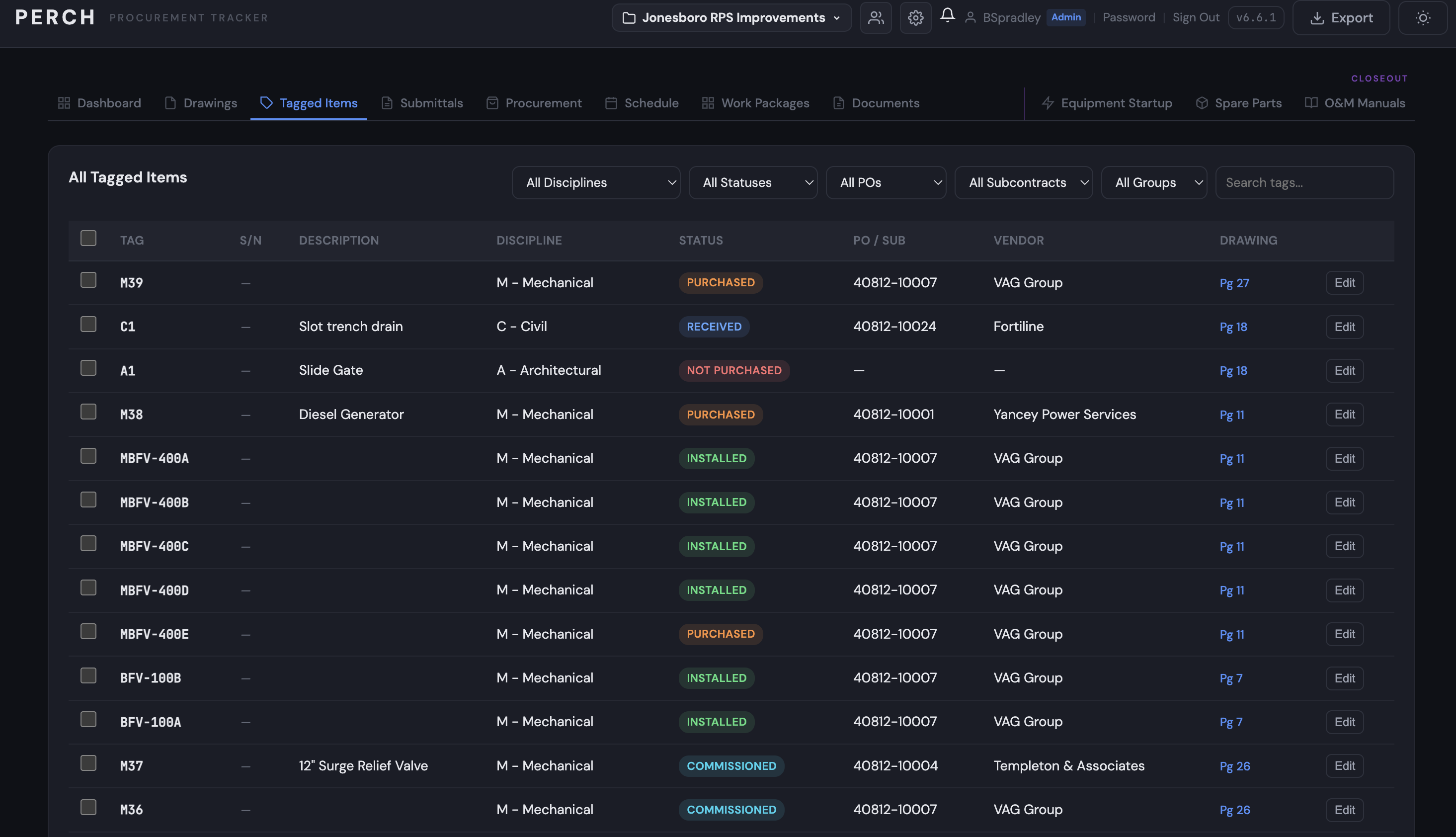
Track every item in one list
Filter by discipline, status, PO, subcontract, or group. See tag numbers, serial numbers, descriptions, vendors, and which drawing each item lives on. Jump straight to any item's location with one click.
Three steps. No training required.
Upload your drawings and specs
Drop your contract documents in. Perch lets you tag items on drawings and auto-detects spec sections from your project manual.
Tag every item, every PO, every submittal
Click on the drawing to tag equipment. Log POs as you cut them. Let AI find your submittal requirements from the specs.
Track it through the whole project
Procurement status, submittal status, delivery, installation, commissioning, and closeout. The same items, all the way through.
Simple, predictable, no surprises.
Free during the beta. Pricing announced soon.
For PMs, supers, and engineers running their own projects.
- ✓ Unlimited projects
- ✓ Unlimited drawings, specs, submittals
- ✓ AI submittal & spec detection
- ✓ Requisition generation
- ✓ Work packages & closeout tracking
- ✓ Per-project data isolation
For project teams of 4+ working the same job.
- ✓ Everything in Individual
- ✓ Unlimited users on the project
- ✓ Role-based access (admin / builder / viewer)
- ✓ Activity feed & change tracking
- ✓ Daily automated backups
- ✓ Priority email support
Questions, answered.
Try Perch on your next project.
30 days free. No credit card. We'll set up your account and email login details within 24 hours.